The Short Version: The best AI app builder in 2026 depends on your technical skill. Developers should use Bolt.new, Lovable, or v0 for code export and control. Non-technical founders should use Mocha - it’s the only AI app builder with built-in database, hosting, and auth that requires zero configuration. Most “vibe coding” tools generate beautiful mockups but fail at deployment. Mocha builds real apps you can actually launch.
You’ve seen the demos. A founder types “build me a SaaS dashboard” into Lovable, and 60 seconds later, a beautiful UI appears. Magic.
Then they try to launch it.
“Connect your Supabase account.” “Configure RLS policies.” “Debug this Netlify build error.” The magic evaporates. What looked like a finished product was actually a frontend mockup with no foundation.
This is the Technical Cliff - the moment where AI code generation meets the brutal reality of production infrastructure. And in 2026, it’s the hidden trap waiting for every non-technical founder who believes the “vibe coding” promise. Whether you’re looking for an AI app builder, AI website builder, or no-code app builder, this gap between demo and deployment is the problem nobody talks about.
We built Mocha because we kept hearing the same story from founders: “the AI built it perfectly, then I spent a week trying to deploy it.” This guide shares our take on the market - where different tools excel, where they fall short, and who should use what.
We’ve talked to hundreds of founders who’ve tried these tools. We’ve watched the support forums, read the Reddit threads, and heard the frustration firsthand. As the team behind Mocha, we’ve spent years building developer tools and have direct experience with what works and what doesn’t in production environments.
Here’s what we’ve learned.
The bottom line: Most AI app builders are excellent at generating code. Almost all of them fail at everything that happens after.
This guide will show you exactly which tool to use based on what you’re actually trying to accomplish - and why the “best” tool depends entirely on whether you’re a developer looking for a coding assistant or a founder trying to run a business.
Which AI App Builder Should You Use in 2026?
The quick answer based on what you’re building:
| If You Need… | Use This | Why |
|---|---|---|
| AI coding assistant (in your IDE) | Cursor, Claude Code, Windsurf | You write the code, AI helps - full control |
| Complex enterprise logic | Bubble | Steeper learning curve, but handles edge cases AI can’t |
| Code export to own infrastructure | Bolt.new or Lovable | Good if you’re a developer who wants to own the stack |
| AI-powered cloud IDE | Replit Agent | Full-stack with 30+ integrations - but costs can escalate |
| Vercel/Next.js full-stack apps | v0 (Vercel) | Beautiful apps with built-in databases - Vercel ecosystem lock-in |
| A landing page or portfolio | Mocha | Live in minutes, not days - includes hosting |
| A real web app (SaaS, booking system, portal) | Mocha | Full stack included - database, auth, hosting, done |
| Small business tools (quotes, CRM, scheduling) | Mocha | HVAC companies, consultants, coaches - build exactly what you need |
| Micro-SaaS products | Mocha | Ship a real product, not a mockup - iterate with real users |
Keep reading for the full breakdown of why most AI tools fail at “Day 2” - and how to avoid burning$50+ in tokens just trying to deploy.
The 2026 AI App Builder Landscape: Three Categories
The AI app builder and AI website builder market has split into three distinct categories. Understanding these categories is the difference between launching your idea and spending weeks debugging deployment errors. Each category serves different users - from developers who want AI code generators to non-technical founders who need no-code app builders.
Category A: The “Vibe Coders” / Code-First AI Builders (Bolt.new, Lovable, Replit, v0)
The Promise: Describe what you want, get working code instantly. The “vibe coding” dream - AI code generation that feels like magic.
The Reality: They build excellent code, but you’re still working in a code environment.
These AI code generators have mastered the “wow” moment - that instant where your description becomes a visual interface. Some have evolved into full-stack platforms (Replit Agent, v0), while others still need external services (Bolt.new, Lovable). All of them expose you to code and require some technical understanding.
Lovable’s Supabase Problem: Lovable generates beautiful React code - seriously beautiful. The component architecture is clean, the TypeScript is well-typed, and the UI patterns follow modern best practices. If you’re a developer reviewing the output, you’ll be impressed.
Then it asks you to “connect Supabase.” For a non-technical user, this means:
- Creating a Supabase account
- Understanding what RLS (Row Level Security) policies are
- Debugging “permission denied” errors when your queries fail
- Managing database migrations when you change your data model
We’ve heard this story dozens of times: a founder spends 3 days trying to understand why form submissions aren’t saving. The answer is usually a Supabase RLS policy misconfiguration. Lovable generates excellent code. It doesn’t generate the knowledge non-technical users need to make it work.
Bolt.new’s Database Gap: Bolt is incredible for browser-based prototyping. The in-browser IDE experience is polished and smooth. You can go from idea to interactive demo faster than almost any other tool. The multi-framework support (React, Vue, Svelte, even vanilla JS) gives you flexibility that opinionated tools can’t match. And they now have built-in hosting with .bolt.host URLs.
The problem comes when your app needs to save data:
- Bolt doesn’t include a database - you need to connect your own
- Most users end up needing Supabase, Firebase, or another external service
- Configuring authentication and database connections requires technical knowledge
Bolt gets you a hosted frontend quickly. But a frontend without persistent data isn’t a product - it’s a demo.
The Verdict: This category spans a range: Replit Agent and v0 now offer real full-stack capabilities with built-in databases. Bolt.new and Lovable still require you to configure external services. All of them expose you to code - making them best suited for technical users or developers.
Category B: The “Legacy No-Code” (Bubble, Webflow)
The Promise: Total visual control without code. The original no-code app builders.
The Reality: The learning curve is a vertical wall.
Bubble’s Workflow Complexity: Bubble is powerful - no exaggeration. The workflow system can handle logic that would stump most AI tools. Complex conditional branching, API integrations, custom plugins - Bubble can do things that Mocha, Lovable, and Bolt simply can’t. For certain types of applications, it’s the only real option.
But “no-code” doesn’t mean “no learning”:
- You must understand Bubble’s proprietary workflow system
- You need to learn database normalization to structure data correctly
- Debugging requires understanding Bubble’s specific logic model
Average time to build a simple app from zero Bubble experience: 2-3 months. That’s not a criticism - it’s the reality of a capable, complex tool. The power comes with complexity.

Webflow’s “Franken-Stack”: Webflow is a visual editor mastered by professional designers and agencies. The animations/interactions system is impressive, and for large content-heavy sites with multiple editors and complex CMS needs, it’s a legitimate choice.
But Webflow wasn’t built for applications. To add any real logic, you need:
- Webflow for the UI
- Wized or similar for logic
- Xano or similar for the backend database
This “Franken-stack” is expensive ($100+/month combined), fragile (three services that can break independently), and requires managing multiple platforms. Most people trying to build a landing page or portfolio don’t need this complexity - they need something that just works.
The Verdict: Best for agencies with designers who already know Webflow, or enterprise teams with complex CMS requirements. Overkill for most founders.
Category C: The “Real App Builder” (Mocha)
The Promise: Real working apps, not mockups. From idea to paying customers. The AI website builder that actually deploys.
The Moat: Complete vertical integration.
Here’s what “vertical integration” actually means in practice:
| Vibe Coding Tools | Mocha |
|---|---|
| ”Connect your Supabase” | Database is built-in |
| ”Deploy to Netlify” | Hosting is automatic |
| ”Configure your environment” | Already configured |
| ”Set up authentication” | Auth is included |
The result: No Technical Cliff.

When you build in Mocha, you never see a connection string. You never debug a build error. You describe what you want, and it runs - not just in a sandbox, but in production with a real URL that you can share with customers.
Who’s Actually Using Mocha:
- Entrepreneurs launching SaaS products and micro-SaaS businesses
- Small business owners (HVAC companies, wellness consultants, carpenters) building quote systems, booking platforms, and client portals
- Coaches and consultants creating member areas and course platforms
- Freelancers and agencies building client dashboards
- Product managers prototyping real features (not just mockups)
- Anyone who needs a landing page, portfolio, or event website live today
The Trade-off: Mocha is opinionated. You can’t bring your own database. You can’t deploy to your own infrastructure. For developers who want to own and export the codebase, Lovable or Bolt might be better.
For everyone else who just wants their idea working and live - Mocha removes the friction entirely.
The Verdict: The only AI app builder where “it works in the demo” and “it works in production” are the same thing. Real apps, not pretty mockups.
The “Technical Cliff” Explained: Why Demos Lie
Here’s exactly what happens when AI code generation meets real infrastructure.
Step 1: The Magic Moment You type: “Build me a customer dashboard with login and payment tracking.” The AI generates: A beautiful React component with mock data.
Step 2: The First Question “Where should this data come from?”
- Lovable: “Connect Supabase” (you now need to learn Supabase)
- Bolt.new: “I’ll create a JSON file” (works in sandbox, useless in production)
- Mocha: Data is automatically stored in the integrated database
Step 3: The Backend
- Lovable: Works… if your Supabase connection and RLS policies are configured correctly
- Bolt.new: You have a hosted frontend, but where does the data go? Time to set up Supabase.
- Mocha: Data saves automatically. You’re live.
Step 4: The First Bug A user reports data isn’t saving.
- Lovable: Is it the code? The RLS policy? The Supabase connection? Where do you even start?
- Bolt.new: Is it the code? The Netlify environment? The build configuration?
- Mocha: Check the error log. One place. One source of truth.
The “Technical Cliff” isn’t about which tool generates better code. It’s about what happens when code meets reality.

Head-to-Head: All Six AI App Builders Compared
Let’s compare all six tools directly on what actually matters for getting an app to production.
Code Generation Quality
| Tool | Code Quality | Framework | Customization |
|---|---|---|---|
| Bolt.new | Excellent | React, Vue, Svelte, vanilla JS | Very High |
| Lovable | Excellent | React + TypeScript | High |
| Replit Agent | Excellent | Any (Python, JS, React, Vue, Go, Rust, etc.) | Very High |
| v0 | Excellent | Next.js + TypeScript only | Moderate |
| Bubble | N/A (visual) | Proprietary visual builder | Very High |
| Mocha | Excellent | React + TypeScript | Moderate |
Winner: Tie (with caveats). All AI tools generate production-quality code. Replit and Bolt offer the most framework flexibility; v0 locks you into Next.js. Bubble doesn’t generate code - it’s a visual builder with its own logic system.
Database Setup
| Tool | Database | Setup Complexity | Your Responsibility |
|---|---|---|---|
| Bolt.new | None (you choose) | Very High | Everything |
| Lovable | Supabase (external) | High | RLS policies, migrations, connection strings |
| Replit Agent | Built-in (PostgreSQL, SQL, KV) | Low | Minimal - Agent configures it |
| v0 | Built-in (Supabase, Neon, AWS Aurora/DynamoDB) | Low | Choose provider, v0 provisions automatically |
| Bubble | Built-in | Medium | Learn Bubble’s data model and constraints |
| Mocha | Built-in | None | Nothing |
Winner: Mocha, then Replit/v0/Bubble. Mocha requires zero configuration. Replit, v0, and Bubble have built-in databases but require learning their specific patterns.
Deployment Reliability
| Tool | Deploy Target | Success Rate | Common Failures |
|---|---|---|---|
| Bolt.new | .bolt.host | High | Database connection issues |
| Lovable | Lovable Cloud / Vercel | Variable | Supabase connection, env variables |
| Replit Agent | Replit Hosting | High | Compute limits, cold starts |
| v0 | Vercel (one-click) | High | Build errors, dependency conflicts |
| Bubble | Built-in | High | Capacity limits on lower tiers |
| Mocha | Integrated | Guaranteed | N/A - deployment can’t fail |
Winner: Mocha, then Bubble. Both have fully integrated hosting. Mocha’s architecture makes deployment failures impossible; Bubble’s mature platform is highly reliable but can hit capacity limits.
Cost to Ship an MVP
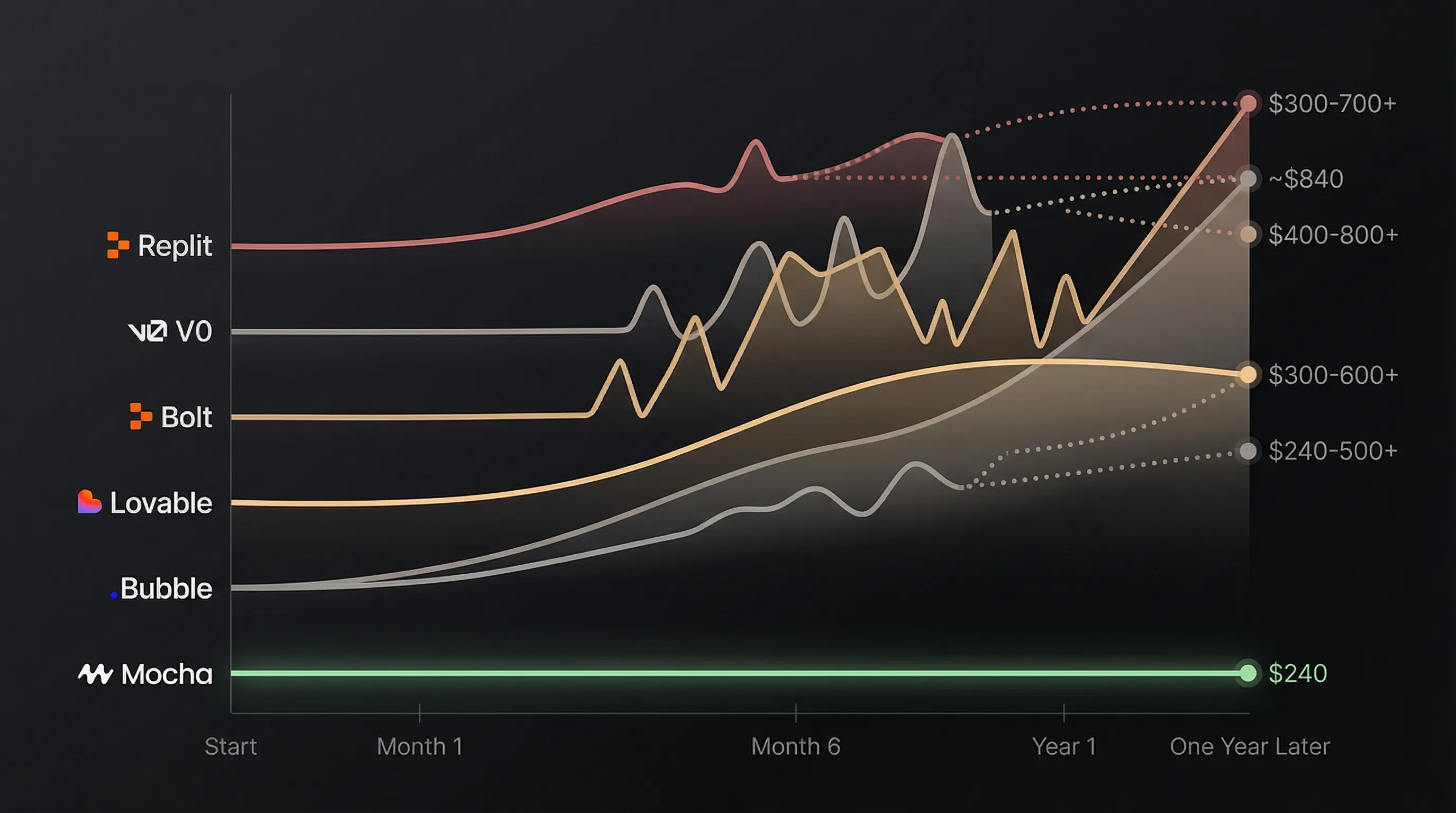
| Tool | Monthly Cost | Hidden Costs | Total Year 1 |
|---|---|---|---|
| Bolt.new | $20/mo | Token overages | $240-500+ |
| Lovable | $25/mo | Supabase (20) | ~$840 |
| Replit Agent | $25/mo (Core) | Usage credits (~$0.25/checkpoint) | $300-600+ |
| v0 | $20/mo (Premium) | Credit overages, Vercel hosting | $240-400+ |
| Bubble | $29/mo (Starter) | Capacity upgrades, workload units | $348-600+ |
| Mocha | $20/mo | None | $240 |
Winner: Mocha. Flat pricing with no surprises. Every other tool has usage-based components or tier upgrades that can escalate costs during growth.
Best Use Case
| Tool | Ideal For | Not Ideal For |
|---|---|---|
| Bolt.new | Quick prototypes, multi-framework flexibility | Apps needing persistent data |
| Lovable | Developers who want React code to export | Non-technical founders |
| Replit Agent | Technical users wanting cloud IDE + AI | Budget-conscious users, simple apps |
| v0 | Teams committed to Vercel/Next.js | Non-Next.js projects, non-technical users |
| Bubble | Complex enterprise logic, custom workflows | Anyone wanting quick results |
| Mocha | Non-technical founders launching real businesses | Developers wanting full code control |
Is Lovable Good for SaaS?
Short answer: Only if you’re a developer.
Lovable generates excellent code. The component library is thoughtfully designed - you get shadcn/ui components that look professional out of the box, proper loading states, error boundaries, and responsive layouts. The code quality stands out.
But Lovable produces code, not running applications. To actually launch, you need:
- User authentication (Lovable uses Supabase Auth - you configure it)
- Data persistence (Supabase - you manage RLS policies)
- Deployment (Vercel/Netlify - you handle environment variables)
- Payments (Stripe - you integrate it)
If you’re a developer who wants to export clean React code and deploy it yourself, Lovable is a solid choice. The AI understands React patterns deeply and produces maintainable code.
If you’re a non-technical founder who just wants a working SaaS product, Lovable will give you a beautiful mockup that you can’t actually launch without technical help.
The Lovable Reality Check:
- Generates excellent React code (this is a real strength)
- You can export and own the codebase
- Requires developer skills to actually deploy
- Best for: Developers who want AI-generated code to deploy themselves
Is Bolt.new Good for Production Apps?
Short answer: Good for frontend, but you’ll need to add your own backend.
Bolt.new is great for:
- Generating code across multiple frameworks (React, Vue, Svelte)
- Building and hosting static sites and UI prototypes
- Developers who want AI-generated starting points
- Built-in hosting with
.bolt.hostURLs (no separate deployment needed)
The in-browser development experience is smooth. You can watch the AI write code, see it render instantly, and iterate quickly. Hosting is now built-in, which removes a previous pain point.
Bolt.new still requires work for:
- Data persistence (no integrated database - you configure Supabase, Firebase, etc.)
- User authentication (external service required)
- Any app that needs to save user data
The Bolt.new Reality Check:
- Great for static sites, landing pages, and UI demos
- Hosting is solved; database is not
- If your app needs to store data, you’re back to configuring external services
- Best for: Developers comfortable setting up their own backend, or apps that don’t need one
Is Replit Agent Good for Building Apps?
Short answer: Capable full-stack builder with cost concerns.
Replit Agent 3 has evolved significantly. It’s now a full-stack platform with built-in database, authentication, hosting, and 30+ integrations (Stripe, Figma, Notion, Salesforce, and more). The agent can work autonomously for up to 200 minutes and tests its own code.
Replit Agent works well for:
- Building full-stack web and mobile apps quickly
- Developers who want a cloud IDE with powerful AI
- Projects that need multiple integrations (payments, analytics, CRM)
- Prototypes that need real backend functionality
The concerns:
- Cost unpredictability: Agent 3’s effort-based pricing makes costs hard to predict. Reddit users report spending 350 in a day when projects go sideways. Budgeting is difficult.
- Speed on complex tasks: Agent 3 can be slow. Users report 20+ minute waits for complex prompts, and multi-file projects slow down significantly.
- Agent overreach: The agent sometimes makes unwanted changes - overriding user intent, redesigning UIs without permission, or breaking working features while “fixing” others. One user reported a $20 prompt that completely redesigned their app’s UI without asking.
The Replit Agent Reality Check:
- Genuinely full-stack: database, auth, hosting, 30+ connectors built-in
- Agent 3 is highly autonomous and capable
- Costs can escalate with heavy usage
- Best for: Developers and technical users who want AI-powered cloud development - may be overkill for simple apps

Is v0 (Vercel) Good for Building Apps?
Short answer: Powerful full-stack platform, but requires Vercel ecosystem commitment.
v0 has evolved from a component generator into a full-stack app builder. It now includes native database integrations (Supabase, Neon, Upstash) and AWS databases (Aurora PostgreSQL, DynamoDB) with automatic provisioning. One-click deployment to Vercel means your app is live instantly.
v0 shines for:
- Building full-stack Next.js applications quickly
- Teams already invested in the Vercel ecosystem
- Projects that need polished UI with real backend functionality
- Developers who want AI-assisted development with code ownership
The trade-offs:
- Vercel lock-in: Everything deploys to Vercel. Great if you’re committed to that ecosystem, limiting if you’re not.
- Complex state management: v0 still struggles with multi-step flows and complex data wiring. You’ll likely need to refactor.
- Framework lock-in: Output is Next.js/React specific. If you want Vue, Svelte, or another framework, v0 isn’t for you.
- Credit-based pricing: Usage can add up quickly with iteration. Every prompt and refinement consumes credits.
The v0 Reality Check:
- Genuinely full-stack now: databases, APIs, deployment all included
- Beautiful UI generation remains a strength
- Locked into Vercel/Next.js ecosystem
- Best for: Developers and technical teams who want AI-powered Next.js development with Vercel infrastructure

Can Non-Technical Founders Actually Build Apps in 2026?
Yes - but only with vertically integrated tools.
The “vibe coding” revolution has been oversold to non-technical founders. The tools can generate code. They cannot generate:
- DevOps knowledge
- Database administration skills
- Debugging ability
- Deployment expertise
The Mocha Difference: Mocha doesn’t ask you to learn these things. It doesn’t give you a “connect your database” screen. The database is already connected. The hosting is already configured. The authentication is already working.
This is what “vertical integration” means: You describe what you want. It works. No Technical Cliff.
What Mocha Can’t Do (Honest Limitations):
- Give you full control over infrastructure (the trade-off for simplicity)
- Let you bring your own database (Supabase users may miss this)
- Deploy to your own servers (enterprise compliance may require this)
- Support frameworks beyond React/TypeScript (Bolt’s flexibility wins here)
- Handle extremely complex business logic (Bubble is more powerful for this)
If you need those things, you’re technical enough to use more complex tools. If you don’t know what those things mean - or if you know and don’t care - Mocha is built for you.
The 2026 AI App Builder Comparison Matrix
Here’s what matters most for shipping a real product. Every tool can generate code - the differences lie in what happens after.
| Tool | Database | Tech Skill | Learning Curve | Cost/Month | Full Stack |
|---|---|---|---|---|---|
| Bolt.new | You configure | Medium | Medium | $20-50 | No |
| Lovable | You configure | Medium | Medium | $25+ | No |
| Replit Agent | Built-in | Medium | Medium-High | $25-100+ | Yes |
| v0 (Vercel) | Built-in | Medium | Medium | $20-30+ | Yes |
| Bubble | Built-in | High | Very High | $29+ | Yes |
| Mocha | Built-in | None | Low | $20 | Yes |
The Hidden Use Case: Replacing Expensive SaaS
Here’s something most AI app builder comparisons miss: you don’t always need to build a startup. Sometimes you just need to stop paying $99/month for a form tool.
The SaaS Tax Problem:
- Typeform:$99/month for analytics and unlimited responses
- Salesforce:$25-300/user/month for CRM
- Airtable:$20/user/month for basic databases
- Monday.com:$24/user/month for project tracking
For a 10-person team, these “simple” tools cost$500-3,000/month. And you’re still limited to their features, their integrations, their roadmap.
The Mocha Alternative: Build exactly what you need. Own the data. Pay a flat$20/month regardless of team size.
We’ve seen users build:
- Form builders with AI lead scoring - replacing Typeform Pro
- Custom CRMs - replacing Salesforce for small teams
- Client portals - replacing expensive white-label solutions
- Internal dashboards - replacing Retool or Metabase
- Booking systems - replacing Calendly + custom logic
This isn’t about building the next unicorn. It’s about owning your tools instead of renting them.
Frequently Asked Questions

What is the best AI app builder in 2026?
The best AI app builder depends on your technical skill level and ecosystem preferences. For developers who want code control, Bolt.new, Lovable, or Cursor work well. For Vercel/Next.js teams, v0 provides full-stack capabilities with beautiful UI. For technical users wanting a cloud IDE, Replit Agent offers 30+ integrations. For non-technical founders who need to launch without managing infrastructure, Mocha handles everything - database, auth, hosting - automatically.
Is Lovable better than Bolt.new?
They’re both mockup generators aimed at developers. Lovable produces cleaner React/TypeScript code and integrates with Supabase. Bolt.new supports more frameworks (Vue, Svelte, etc.) and has a smoother in-browser experience. Both generate code you need to deploy yourself. Neither is designed for non-technical users. If you’re a developer who wants AI-generated code as a starting point, either works - choose based on your preferred stack.
How does Mocha compare to Bubble?
Bubble is more powerful for complex business logic - it can handle edge cases and workflows that AI tools struggle with. But Bubble requires 2-3 months of learning before you can build anything useful. Mocha gets you to a working app in hours using natural language. If you need enterprise-grade complexity and have time to learn, Bubble is worth considering. If you need something live this week, Mocha wins.
How does Mocha compare to Webflow?
Webflow is a visual editor for websites, not applications. It’s mastered by professional designers and excels at marketing sites with complex animations. To build an app with Webflow, you need to add Wized for logic and Xano for a database - creating an expensive, fragile “Franken-stack.” Mocha builds full applications (database, auth, hosting included) using natural language. For landing pages and portfolios, Mocha is simpler. For content-heavy sites with multiple editors, Webflow’s CMS is more robust.
How does Mocha compare to Cursor or Claude Code?
Cursor, Claude Code, and Windsurf are AI coding assistants for developers - they help you write code faster within an IDE. Mocha is an app builder for non-technical users - it builds the entire application for you. If you’re a developer who wants AI help while coding, use Cursor. If you can’t code and just want a working app, use Mocha. They’re fundamentally different tools for different users.
How does Mocha compare to Replit Agent?
Replit Agent 3 is a powerful cloud IDE with built-in database, auth, hosting, and 30+ integrations. It’s technically capable of building full-stack apps. The key differences: Replit is a code environment (you’re still working with code), while Mocha uses natural language only. Replit’s effort-based pricing can escalate quickly - users report 20/month. Replit is ideal for technical users who want AI-assisted cloud development. Mocha is for non-technical founders who want to describe what they need and have it work.
How does Mocha compare to v0 (Vercel)?
v0 has evolved into a full-stack platform with built-in databases (Supabase, Neon, AWS) and one-click Vercel deployment. Both v0 and Mocha can now build complete applications. The key differences: v0 locks you into the Vercel/Next.js ecosystem, while Mocha is platform-agnostic. v0 still requires some technical knowledge (Next.js patterns, code understanding), while Mocha is designed for non-technical users. v0 is excellent for teams already committed to Vercel; Mocha is better for founders who just want their app working without framework decisions.
Can I build a SaaS without coding in 2026?
Yes. Tools like Mocha let non-technical users build and deploy complete web applications - including SaaS products - using natural language. The database, authentication, and hosting are all included. You describe what you want, and you get a working product with a URL. The limitation: extremely complex applications with unusual business logic may still need custom development. But for most SaaS ideas, you can build and launch without writing code.
Why do AI app builders fail at deployment?
AI app builders excel at code generation but fail at deployment because deployment requires infrastructure knowledge - server configuration, environment variables, database connections, and hosting setup. Tools that generate code and tell you to “deploy to Netlify” are passing the hardest part to you. Vertically integrated tools like Mocha eliminate this problem by including hosting as part of the platform.
What is the “Technical Cliff” in AI app building?
The Technical Cliff is the point where AI-generated code meets production infrastructure. It’s the moment when a beautiful prototype becomes a series of deployment errors, database configuration screens, and debugging sessions. Most AI tools create the cliff by generating code that works in a sandbox but requires external services to actually run.
How much does it cost to build an app with AI in 2026?
Costs vary significantly. Bolt.new:$20-50/month (Netlify free tier available for hosting). Lovable:$25/month (Supabase has a free tier for MVPs, or$25/month for Pro). Bubble:$29/month to start. Mocha:$20/month flat (hosting and database included). The “hidden cost” is your time - debugging deployment issues or configuring external services can cost hours or days.
Is there a free AI app builder?
Most AI app builders offer free tiers with limitations. Bolt.new has a free tier for basic prototyping. Lovable offers limited free usage. Replit has a free tier but Agent features require paid plans. v0 provides free credits for new users. Mocha has a free trial. However, “free” typically means no database, limited hosting, or usage caps. For production apps with real users, expect to pay $20-30/month minimum across all platforms.
Which is better: Bolt.new vs Lovable?
Bolt.new and Lovable serve similar audiences but have different strengths. Bolt.new excels at multi-framework support (React, Vue, Svelte) and has a smoother in-browser IDE experience with built-in hosting. Lovable produces cleaner React/TypeScript code and has tighter Supabase integration. Neither includes a database - both require external services for data persistence. Choose Bolt.new for framework flexibility; choose Lovable for React projects where you want to export clean code. Both target developers, not non-technical founders.
What is a good Bubble alternative?
The best Bubble alternative depends on what you need. For complex business logic without learning Bubble’s workflow system, consider Mocha - you describe what you want in natural language instead of building visual workflows. For developers who want code, Lovable or Bolt.new generate exportable code (though you lose Bubble’s no-code approach). For Vercel teams, v0 offers AI-powered development with built-in databases. Bubble remains the most powerful option for complex apps, but requires 2-3 months of learning.
What is a good Webflow alternative?
The best Webflow alternative depends on your use case. For landing pages and portfolios, Mocha is simpler - describe what you want and it’s live immediately, with hosting included. For marketing sites with complex animations, Framer offers similar visual editing with better performance. For full applications (not just websites), Webflow requires adding Wized + Xano, while Mocha includes database and auth natively. For content-heavy sites with multiple editors, Webflow’s CMS remains best-in-class. Mocha replaces the “Franken-stack” (Webflow + Wized + Xano) with a single integrated platform.
What are the best vibe coding tools in 2026?
The top vibe coding tools in 2026 are Bolt.new, Lovable, Replit Agent, and v0. All let you describe what you want and generate working code. Bolt.new offers the most framework flexibility. Lovable produces the cleanest React code. Replit Agent is the most autonomous with 30+ integrations. v0 creates beautiful Next.js apps with built-in databases. The catch: all except v0 and Replit still require you to configure external services for databases. For non-technical users who want working apps without touching code, Mocha skips the “vibe coding” step entirely - you get a deployed app, not code to configure.
The Bottom Line: Which AI App Builder Should You Choose?
Choose Cursor, Claude Code, or Windsurf if:
- You’re a developer who wants AI assistance while staying in control
- You want to write code yourself with intelligent autocomplete and suggestions
- You need to work within an existing codebase
Choose Bolt.new or Lovable if:
- You’re a developer who wants to export code and own the full stack
- You’re comfortable configuring Supabase, Netlify, or Vercel yourself
- You want flexibility to deploy wherever you want
- You’re building a prototype to hand off to an engineering team
Choose Replit Agent if:
- You’re a technical user who wants AI-powered cloud development
- You need 30+ integrations (Stripe, Salesforce, Notion, etc.)
- You’re comfortable with a code environment and variable costs
- You want maximum autonomy in how the AI builds your app
Choose v0 if:
- You’re already committed to the Vercel/Next.js ecosystem
- You want full-stack apps with beautiful UI and built-in databases
- Your team has Next.js knowledge to refine generated code
- You need one-click deployment to Vercel infrastructure
Choose Bubble if:
- You need complex business logic that AI tools can’t reliably handle
- You’re willing to invest 2-3 months learning the platform
- You need capabilities beyond what any AI tool currently offers
Choose Mocha if:
- You’re a non-technical founder who needs to ship a real product
- You want a working app, not a mockup you can’t deploy
- You’re a small business owner building tools for your business (quotes, booking, CRM)
- You’re launching a micro-SaaS or productized service
- You need a landing page, portfolio, or event site live today
- You’re a coach, consultant, or freelancer building client-facing tools
- You want to replace expensive per-seat SaaS with tools you own
- You’re a PM who needs real prototypes, not static mockups
Your Move
The AI app builder market has matured. The question is no longer “can AI build apps?” - it clearly can. The question is “can AI get apps to production?”
Most tools generate mockups. Beautiful mockups with clean code that you can’t actually deploy without technical help.
Mocha builds real apps. The database works. The authentication works. The hosting works. You describe what you want, and you get a URL you can share with customers - not a GitHub repo you can’t use.
We built Mocha for the 99% of people who can’t code but have ideas worth building. Entrepreneurs. Small business owners. Coaches. Consultants. Anyone who’s been told “you need a developer for that.”
You don’t. Not anymore.
Ready to build something real?
- Start building for free with Mocha
- See what others have built
- Learn how to get results with AI builders
This comparison reflects the state of AI app builders as of January 2026. Last updated: January 2026. Tools evolve rapidly - but architectural decisions (integrated vs. external infrastructure) tend to persist. The difference between “mockup generators” and “real app builders” isn’t a bug competitors will fix; it’s a fundamental design choice.
Disclosure: This article is written by the Mocha team. We’ve aimed for objectivity and acknowledged where competitors excel, but readers should consider our perspective when evaluating our recommendations. We encourage you to try multiple tools before deciding.